
Setting up a mail relay for self-hosted services under Docker

Installing, Securing and Updating Mail Relay
Mac Mini · Docker · Postfix · Brevo
A small internal Postfix relay provides a single, reliable SMTP endpoint for Docker applications. Applications send mail to mailrelay:25 without needing individual Brevo credentials; Postfix then authenticates to Brevo over encrypted SMTP and handles delivery.
This keeps application configuration simple, centralises outbound email, and ensures that credentials are stored in only one place.
Architecture
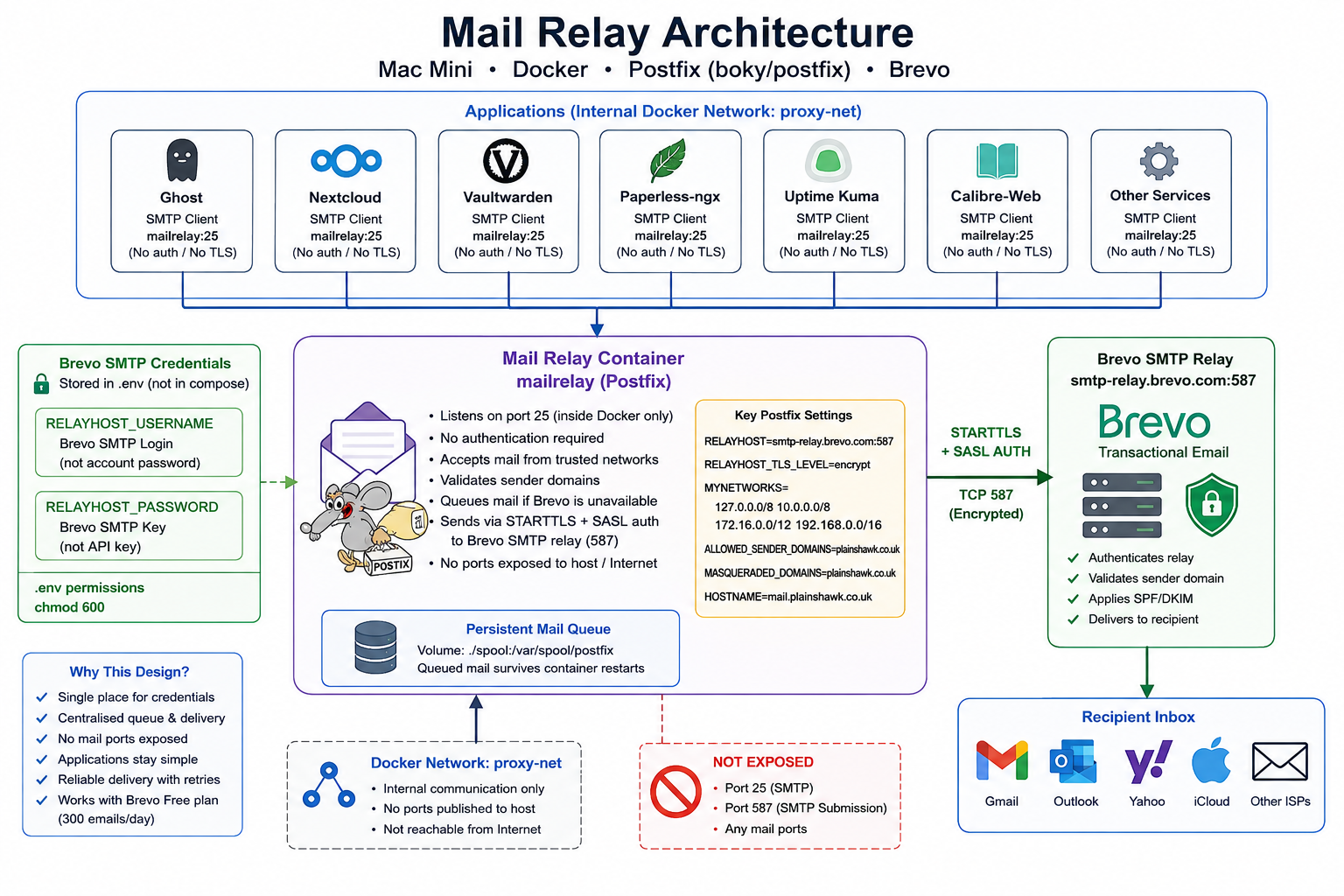
Important security property
Applications communicate with Postfix only over Docker's internal network:
Application → mailrelay:25
Postfix then makes the only external SMTP connection:
mailrelay → smtp-relay.brevo.com:587
There is therefore no reason to expose port 25, 587 or any other mail port through the router.
Key Lessons Incorporated From Your Setup
- Brevo credentials belong in
.env— this makes the SMTP login and key easy to locate and update without embedding secrets indocker-compose.yml. - The Brevo SMTP key is not your account password — and it is not an API key. Brevo explicitly requires an SMTP key for SMTP authentication. (Brevo Help)
- Use the SMTP login shown by Brevo — do not assume it is the same as the email address used to sign into Brevo. The current Brevo documentation identifies the SMTP login separately in the SMTP settings. (Brevo Help)
- Ghost needs
tls__rejectUnauthorized=falsein this installation because the relay advertises STARTTLS using its locally generated/self-signed certificate. Ghost otherwise rejects the certificate. sasl-xoauth2warnings are harmless — the image contains the plugin, but Brevo authentication here uses conventional SMTP authentication rather than OAuth2.- Use
latest-alpinerather thanlatestfor this installation. The Alpine variant is smaller and supports ARM64. The current stablelatest-alpinetag corresponds to the 5.1.0 Alpine release. (Docker Hub) - For maximum reproducibility, pin the image version rather than following a moving tag. For example,
boky/postfix:5.1.0-alpine. - Do not publish any host port for Postfix — Docker's internal DNS and networking are all that is required.
- Persist the Postfix spool — otherwise messages waiting for delivery disappear when the container is recreated.
- Brevo's Free plan currently allows 300 email sends per day. Unused quota does not roll over. (Brevo Help)
- Keep the relay on a trusted Docker network — any container that can reach Postfix and falls within
MYNETWORKScan potentially submit mail.
Prerequisites
Before starting, make sure you have:
- Docker Desktop running
- The
proxy-netDocker network already created - An active Brevo account
- A verified
plainshawk.co.uksending domain - SPF and DKIM configured in Cloudflare
- A Brevo SMTP key
- Outbound TCP 587 connectivity from the Mac Mini
No router port forwarding is required.
The mail relay is entirely outbound.
Stage 1 — Verify Brevo Setup
Before creating the container, make sure the Brevo account is ready.
1 — Obtain the SMTP credentials
Log into Brevo and open:
Settings → SMTP & API → SMTP
Record the SMTP login shown there.
Then create or regenerate an SMTP key.
The credentials used by Postfix are:
RELAYHOST_USERNAME = Brevo SMTP login
RELAYHOST_PASSWORD = Brevo SMTP key
Critical distinction
The SMTP password is not:
- your Brevo account password
- a Brevo API key
- your domain password
It is the dedicated SMTP key generated by Brevo. (Brevo Help)
If you no longer have the key, generate a new one.
Brevo only displays the SMTP key when it is created, so store it securely.
2 — Verify your domain
In Brevo, go to the sender/domain authentication area and confirm that:
plainshawk.co.uk
is authenticated.
Your DNS should contain the SPF and DKIM records provided by Brevo.
For example, the SPF record may contain:
v=spf1 include:spf.brevo.com mx ~all
Do not blindly replace an existing SPF record.
If you already have an SPF record, incorporate Brevo's include into the existing record rather than creating a second SPF record.
Once DNS is configured, verify the domain in Brevo.
Stage 2 — Create the Directory Structure
mkdir -p ~/docker/mailrelay
cd ~/docker/mailrelay
Stage 3 — Create the Secrets File
Create the environment file:
nano .env
Add:
RELAYHOST_USERNAME=your_brevo_smtp_login
RELAYHOST_PASSWORD=your_brevo_smtp_key
For example:
RELAYHOST_USERNAME=xxxxxxxx@smtp-brevo.com
RELAYHOST_PASSWORD=your-generated-smtp-key
Secure the file:
chmod 600 .env
Also store the SMTP credentials in Vaultwarden.
If the .env file is lost, the SMTP key can be regenerated in Brevo.
Never commit .env to Git
If this directory is ever placed under version control, add:
.env
to .gitignore.
Stage 4 — Create the Compose File
nano docker-compose.yml
Use:
services:
  mailrelay:
    image: boky/postfix:latest-alpine
    container_name: mailrelay
    restart: unless-stopped

    env_file:
      - .env

    environment:
      - TZ=Europe/London

      # Brevo SMTP relay
      - RELAYHOST=smtp-relay.brevo.com:587
      - RELAYHOST_TLS_LEVEL=encrypt

      # Networks allowed to submit mail
      - MYNETWORKS=127.0.0.0/8 10.0.0.0/8 172.16.0.0/12 192.168.0.0/16

      # Restrict accepted sender domains
      - ALLOWED_SENDER_DOMAINS=plainshawk.co.uk
      - MASQUERADED_DOMAINS=plainshawk.co.uk

      # Postfix hostname
      - HOSTNAME=mail.plainshawk.co.uk

    volumes:
      - ./spool:/var/spool/postfix

    logging:
      driver: json-file
      options:
        max-size: 10m
        max-file: "3"

    networks:
      - proxy-net

networks:
  proxy-net:
    external: true
Why latest-alpine?
The boky/postfix project provides Alpine-based images as well as Debian and Ubuntu variants. The current latest-alpine tag is multi-platform and includes ARM64 support, making it appropriate for an Apple Silicon Mac. (Docker Hub)
The project also supports versioned tags. If you want completely reproducible deployments, replace:
image: boky/postfix:latest-alpine
with a specific version, for example:
image: boky/postfix:5.1.0-alpine
The trade-off is that a pinned version will not receive image updates until you deliberately change the tag.
Understanding the Important Settings
| Variable | Purpose |
|---|---|
RELAYHOST |
Brevo's SMTP endpoint |
RELAYHOST_USERNAME |
Brevo SMTP login |
RELAYHOST_PASSWORD |
Brevo SMTP key |
RELAYHOST_TLS_LEVEL=encrypt |
Requires TLS when Postfix connects to Brevo |
MYNETWORKS |
Networks permitted to submit mail |
ALLOWED_SENDER_DOMAINS |
Restricts permitted sender domains |
MASQUERADED_DOMAINS |
Normalises internal sender addresses |
HOSTNAME |
Hostname presented by Postfix |
The Brevo credentials are deliberately supplied through .env rather than being embedded in the Compose file.
The boky/postfix image supports these relay credentials and TLS settings directly. (GitHub)
Stage 5 — Create the Spool Directory
Create the persistent mail queue:
mkdir -p ~/docker/mailrelay/spool
This is important.
If Brevo is temporarily unavailable, Postfix can queue messages locally and retry delivery.
Without the volume:
- ./spool:/var/spool/postfix
queued mail would be lost when the container is destroyed.
Stage 6 — Start the Mail Relay
Start Postfix:
docker compose up -d
Watch the logs:
docker compose logs -f mailrelay
Look for normal Postfix startup messages.
You may see messages relating to:
sasl-xoauth2
These are not necessarily errors.
The relay uses normal SMTP authentication with Brevo; OAuth2/XOAUTH2 is not required for this configuration.
Press:
Ctrl+C
once Postfix is running normally.
Verify the Docker network
Run:
docker inspect mailrelay | grep -A 5 '"Networks"'
You should see:
proxy-net
The relay must be on the same Docker network as the applications that send mail.
Stage 7 — Send a Test Email
Before configuring every application, prove that the relay can deliver through Brevo.
Run:
docker exec mailrelay sendmail -v your_email@gmail.com << EOF
Subject: Test from mailrelay
From: test@plainshawk.co.uk
To: your_email@gmail.com

This is a test from the Docker mail relay.
EOF
Check the Postfix queue:
docker exec mailrelay postqueue -p
If the message is queued rather than immediately delivered, flush the queue:
docker exec mailrelay postqueue -f
Then check the Postfix logs:
docker compose logs --tail=50 mailrelay
You should see a successful delivery status.
Also check:
Brevo → Transactional → Email → Logs
The message should appear there.
Brevo provides transactional delivery logs and statistics for monitoring SMTP delivery. (Brevo Help)
Stage 8 — Configure Applications to Use the Relay
Once the relay works, applications no longer need individual Brevo SMTP credentials.
They simply use:
SMTP host: mailrelay
SMTP port: 25
Authentication: none
Encryption: none
The connection between the application and Postfix is internal to Docker.
Postfix handles the authenticated, encrypted connection to Brevo.
Ghost
Edit:
~/docker/ghost/docker-compose.yml
Add:
environment:
  - mail__transport=SMTP
  - mail__from=Plainshawk <noreply@plainshawk.co.uk>
  - mail__options__host=mailrelay
  - mail__options__port=25
  - mail__options__secure=false
  - mail__options__tls__rejectUnauthorized=false
Why tls__rejectUnauthorized=false?
In this installation, Postfix advertises STARTTLS on its internal SMTP service using a locally generated certificate.
Ghost therefore needs to be told not to reject that certificate.
The important point is that this setting applies only to the internal Ghost → Postfix connection.
Postfix's external connection to Brevo remains encrypted and authenticated.
Restart Ghost:
cd ~/docker/ghost
docker compose up -d --force-recreate
Test Ghost email delivery.
Nextcloud
Nextcloud can be configured with occ.
Run:
docker exec -u www-data nextcloud php occ \
  config:system:set mail_smtphost --value="mailrelay"

docker exec -u www-data nextcloud php occ \
  config:system:set mail_smtpport --value=25 --type=integer

docker exec -u www-data nextcloud php occ \
  config:system:set mail_smtpsecure --value=""

docker exec -u www-data nextcloud php occ \
  config:system:set mail_from_address --value="nextcloud"

docker exec -u www-data nextcloud php occ \
  config:system:set mail_domain --value="plainshawk.co.uk"
No SMTP username or password is required.
Test with:
Nextcloud → Administration → Basic settings → Email
and send a test message.
Vaultwarden
In:
~/docker/vaultwarden/docker-compose.yml
configure:
environment:
  - SMTP_HOST=mailrelay
  - SMTP_PORT=25
  - SMTP_SECURITY=off
  - SMTP_FROM=vault@plainshawk.co.uk
  - SMTP_FROM_NAME=Vaultwarden
Restart:
cd ~/docker/vaultwarden
docker compose up -d --force-recreate
Then test Vaultwarden's email functionality.
Uptime Kuma
In Uptime Kuma notification settings:
| Field | Value |
|---|---|
| Hostname | mailrelay |
| Port | 25 |
| Security | None / Off |
| Ignore TLS errors | On |
| From | uptime@plainshawk.co.uk |
Send a test notification.
Paperless-ngx
In:
~/docker/paperless/docker-compose.yml
use:
environment:
  - PAPERLESS_EMAIL_HOST=mailrelay
  - PAPERLESS_EMAIL_PORT=25
  - PAPERLESS_EMAIL_USE_TLS=false
  - PAPERLESS_EMAIL_FROM=paperless@plainshawk.co.uk
Restart Paperless after making the change.
Calibre-Web
For Kindle/email delivery, open:
Calibre-Web → Admin → Configuration → Email
Use:
| Field | Value |
|---|---|
| SMTP server | mailrelay |
| SMTP port | 25 |
| Encryption | None |
| From email | books@plainshawk.co.uk |
Test by sending a book.
Stage 9 — Add the Relay to the Startup Script
The mail relay should start early because several applications depend on it.
Edit:
nano ~/docker/start-all.sh
Place this near the beginning of the application startup sequence:
# Start mail relay early — services depend on it
echo "Starting Mail Relay..."
cd /Users/gavin/docker/mailrelay && docker compose up -d

# Give Postfix a moment to initialise
sleep 5
It should start before:
- Ghost
- Nextcloud
- Vaultwarden
- Paperless
- Uptime Kuma
The relay should be started well before Nginx Proxy Manager.
Stage 10 — Monitor the Relay with Uptime Kuma
Postfix is not an HTTP application, so use a TCP monitor.
Create:
| Field | Value |
|---|---|
| Name | Mail Relay |
| Monitor Type | TCP Port |
| Hostname | mailrelay |
| Port | 25 |
| Heartbeat | 60 seconds |
| Retries | 3 |
This checks that Postfix is accepting SMTP connections.
It does not prove that Brevo is accepting or delivering messages, so periodic end-to-end email testing is still worthwhile.
Stage 11 — Back Up the Mail Queue
The Postfix spool contains messages waiting to be delivered.
Your normal Docker backup should include:
~/docker/mailrelay/spool
For example:
cp -r ~/docker/mailrelay/spool \
  $BACKUP_DIR/mailrelay_spool_$DATE
The .env file containing the Brevo credentials should also be protected.
However, do not put the SMTP credentials into an unencrypted general-purpose backup.
The credentials should already exist in Vaultwarden, which should be your authoritative secret store.
Updating the Mail Relay
Postfix has no application database to migrate, so updates are relatively simple.
Update the Alpine image
cd ~/docker/mailrelay

docker compose pull

docker compose up -d --force-recreate

docker compose logs -f mailrelay
Then send a test email.
Check the image version
docker image inspect boky/postfix:latest-alpine \
  --format '{{index .RepoDigests 0}}'
For a completely controlled environment, pin the Compose file to a specific release:
image: boky/postfix:5.1.0-alpine
The project publishes versioned Alpine tags as well as the moving latest-alpine tag. (Docker Hub)
Updating the Brevo SMTP Key
If you need to replace the Brevo SMTP key:
- Generate a new SMTP key in Brevo.
- Edit:
nano ~/docker/mailrelay/.env
- Replace:
RELAYHOST_PASSWORD=old-key
with the new key.
- Restart Postfix:
cd ~/docker/mailrelay
docker compose up -d --force-recreate
- Send a test email.
- Once confirmed, revoke the old Brevo key if it is no longer required.
Monitoring Brevo Usage
The Brevo Free plan currently provides:
300 email sends per day
The quota resets daily and unused messages do not roll over. (Brevo Help)
Monitor usage in Brevo under the transactional email statistics/usage areas.
This is more than adequate for:
- Nextcloud notifications
- Vaultwarden notifications
- Ghost administration
- Uptime Kuma alerts
- Paperless notifications
- occasional Calibre-Web book delivery
However, it can become restrictive if Ghost is subsequently used for newsletters.
If you begin sending large mailing lists through Ghost, consider a paid Brevo plan or another dedicated bulk-mail service.
Security Considerations
The relay is intentionally internal
There should be no entry such as:
ports:
  - "25:25"
or:
ports:
  - "587:587"
in the Compose file.
Applications access:
mailrelay:25
through Docker DNS.
The Mac itself does not need to expose SMTP to the LAN or Internet.
MYNETWORKS is a trust boundary
The current configuration allows:
10.0.0.0/8
172.16.0.0/12
192.168.0.0/16
This is convenient because it covers the Docker networks used by the installation.
However, it also means that any container on proxy-net whose source address falls within these ranges may be able to submit mail.
This is acceptable when proxy-net is treated as a trusted application network.
For a more security-conscious deployment, a future improvement would be to create a dedicated:
mail-net
and attach only the applications that actually need outbound email to it.
For the current Mac Mini installation, keeping the relay internal and not publishing SMTP ports provides a substantial security improvement over exposing Postfix externally.
Quick Reference
| Detail | Value |
|---|---|
| Container | mailrelay |
| Internal SMTP host | mailrelay |
| Internal SMTP port | 25 |
| External SMTP relay | smtp-relay.brevo.com:587 |
| External encryption | STARTTLS |
| Authentication | Brevo SMTP key |
| Sender domain | plainshawk.co.uk |
| Docker network | proxy-net |
| Host ports | None |
| Persistent data | ./spool |
| Secrets | ./.env + Vaultwarden |
| Brevo Free allowance | 300 sends/day |
Brevo currently documents ports 587, 465 and 2525 for SMTP; port 587 is used here with STARTTLS. (Brevo Help)
Troubleshooting
535 Authentication failed
The most likely causes are incorrect Brevo credentials.
Check:
cat ~/docker/mailrelay/.env
Verify that:
RELAYHOST_USERNAME
contains the SMTP login shown by Brevo, and:
RELAYHOST_PASSWORD
contains the SMTP key.
Do not use:
- your Brevo account password
- a Brevo API key
smtp-relay.brevo.comas the username
Brevo specifically identifies incorrect SMTP credentials as a common cause of 535 errors. (Brevo Help)
If in doubt, generate a new SMTP key.
535 even though the credentials look correct
Check for accidental whitespace in .env.
A copied SMTP key with an extra space or line break can cause authentication to fail. Brevo specifically warns about this. (Brevo Help)
Regenerate the key if necessary.
Ghost reports an ESOCKET or certificate error
Check that Ghost contains:
- mail__options__secure=false
- mail__options__tls__rejectUnauthorized=false
Then recreate Ghost:
cd ~/docker/ghost
docker compose up -d --force-recreate
Mail is queued but not delivered
Check:
docker exec mailrelay postqueue -p
Then:
docker exec mailrelay postqueue -f
Inspect the logs:
docker compose logs --tail=50 mailrelay
Look for:
status=sent
or an SMTP error from Brevo.
Also check Brevo's transactional email logs.
Brevo is rejecting the sender
Make sure the sender uses your authenticated domain:
@plainshawk.co.uk
For example:
noreply@plainshawk.co.uk
Do not use the Brevo SMTP login as the From address.
Brevo distinguishes between the SMTP authentication login and the verified sender address. (Brevo Help)
Emails are going to spam
Check:
- SPF
- DKIM
- DMARC
- Brevo domain authentication
- The From address
- Recipient-provider reputation
Brevo currently recommends authenticating the sender domain, particularly because of modern Gmail, Yahoo and Microsoft sender requirements. (Brevo Help)
Relay access denied
Check the Docker network:
docker network inspect proxy-net
Check the relay container:
docker inspect mailrelay | grep -A 5 '"Networks"'
If the sending application's IP is outside the configured MYNETWORKS ranges, Postfix will reject it.
Also check the Postfix configuration:
docker exec mailrelay postconf mynetworks
Application cannot resolve mailrelay
Check that both containers are on the same Docker network:
docker inspect mailrelay
docker inspect <application-container>
Both should contain:
proxy-net
If an application is missing from the network, add it to its Compose file:
networks:
  - proxy-net
with:
networks:
  proxy-net:
    external: true
Then recreate the application.
Mail relay disappears after a container restart
Check that the spool volume exists:
ls -la ~/docker/mailrelay/spool
The Compose file must contain:
volumes:
  - ./spool:/var/spool/postfix
Without this volume, queued messages are lost when the container is recreated.
sasl-xoauth2 warnings appear in the logs
These can be ignored for this configuration.
The image includes support for XOAUTH2, but this installation uses normal SMTP authentication with the Brevo SMTP login and SMTP key.
You do not need to configure XOAUTH2.
Final Operational Checklist
After installation or an update, verify:
☐ mailrelay container is running
☐ mailrelay is connected to proxy-net
☐ No host SMTP ports are exposed
☐ .env is chmod 600
☐ Brevo SMTP login is correct
☐ Brevo SMTP key is correct
☐ plainshawk.co.uk is authenticated in Brevo
☐ SPF is valid
☐ DKIM is valid
☐ Test email is delivered
☐ Postfix queue is empty
☐ Ghost can send mail
☐ Nextcloud can send mail
☐ Vaultwarden can send mail
☐ Uptime Kuma can send notifications
☐ Paperless can send mail
☐ Calibre-Web can send mail
☐ Uptime Kuma TCP monitor is green
☐ Mail spool is included in backups
☐ SMTP credentials are stored in Vaultwarden
☐ Brevo daily usage is being monitored
The resulting arrangement is deliberately simple:
                     INTERNAL
                        │
    ┌───────────────────┼───────────────────┐
    │                   │                   │
  Ghost             Nextcloud          Vaultwarden
    │                   │                   │
    └───────────────────┼───────────────────┘
                        │
                   mailrelay:25
                     Postfix
                        │
                        │ STARTTLS
                        │ SMTP AUTH
                        ▼
               smtp-relay.brevo.com:587
                        │
                        ▼
                  Recipient Inbox
The applications know nothing about Brevo. They only know about mailrelay:25; Postfix is responsible for authentication, encryption, queuing and onward delivery.